OpenID Connect
By default, Lime Forms uses its own username and password login for administrators. You can replace this with OpenID Connect (OIDC), which delegates authentication to an identity provider your organisation already uses — such as Okta, Microsoft Entra ID (Azure AD), or Google Workspace.
Why use OpenID Connect?
Single sign-on (SSO) — Users log in to Lime Forms using the same account they use for everything else in your organisation. No separate password to remember or reset.
Centralised user management — Access is controlled from your identity provider. When an employee leaves and their account is deactivated there, they immediately lose access to Lime Forms as well. You do not need to manage users in two places.
Stronger security — Your existing password policies, multi-factor authentication requirements, and session controls automatically apply to Lime Forms logins.
Automatic user provisioning — With Just-In-Time provisioning enabled, users are created in Lime Forms automatically the first time they log in via the identity provider. There is no need to manually create accounts in advance.
The login method of Lime Forms can be changed to openid connect. To use oidc as the login method you need to have:
- Oidc provider with an application set up
- Database connected to oidc application containing users
A consultant then needs to update your application environment to use oidc as the login method
Oidc configuration
Oidc credentials you need to provide consultant with
oidc provider - Url to the oidc provider
oidc provider client id - Client id from provider
oidc provider client secret - Client secret from provider
Available optional customizations for Forms oidc
-
JIT provision of users
Create the user automatically in the forms database if it is not already existing (check is made against configured oidc_id_property if user already exists)
-
Oidc id property
The identifier property from provider to map against. This is used to determine if the user already exists in the forms database (
subby default) -
Oidc email property
The email property from oidc provider to map against the email used in forms (
emailby default) -
Oidc name property
The name property from provider to map against (
nameby default) -
Provider config cache for X amount of time
For how long the oidc provider config should be cached by the application. (
12 hoursby default)
Map existing Forms users to users from oidc provider
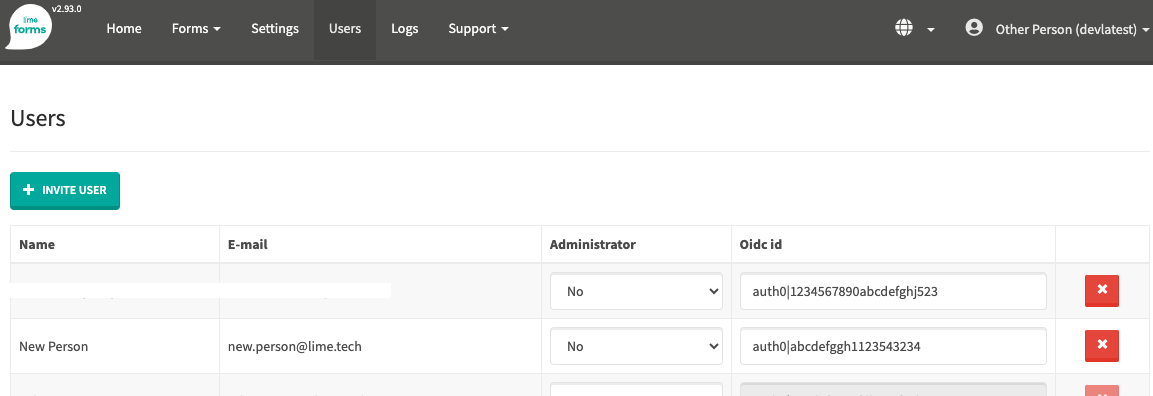
In Forms database the user email is considered unique. If you switch from normal login to oidc but want to keep the user history, you might need to do some mapping of provider ids to the already exisiting users in Forms.
- As a logged in admin in Forms visit the Users page in the UI (/admin/users)
- In the users table add the id from the provider to the desired user